Shopify collection page SEO: a practical guide.
Someone searching "linen duvet covers" usually wants to compare options, not see one product. A collection fits that search well, yet many are little more than a product grid. Here is how to make yours worth ranking.
 By Carl Gulfven, Swedish entrepreneur with 20 years in ecommerce SEO
Reviewed 4 November 2026
1. Choose one main keyword per collection.
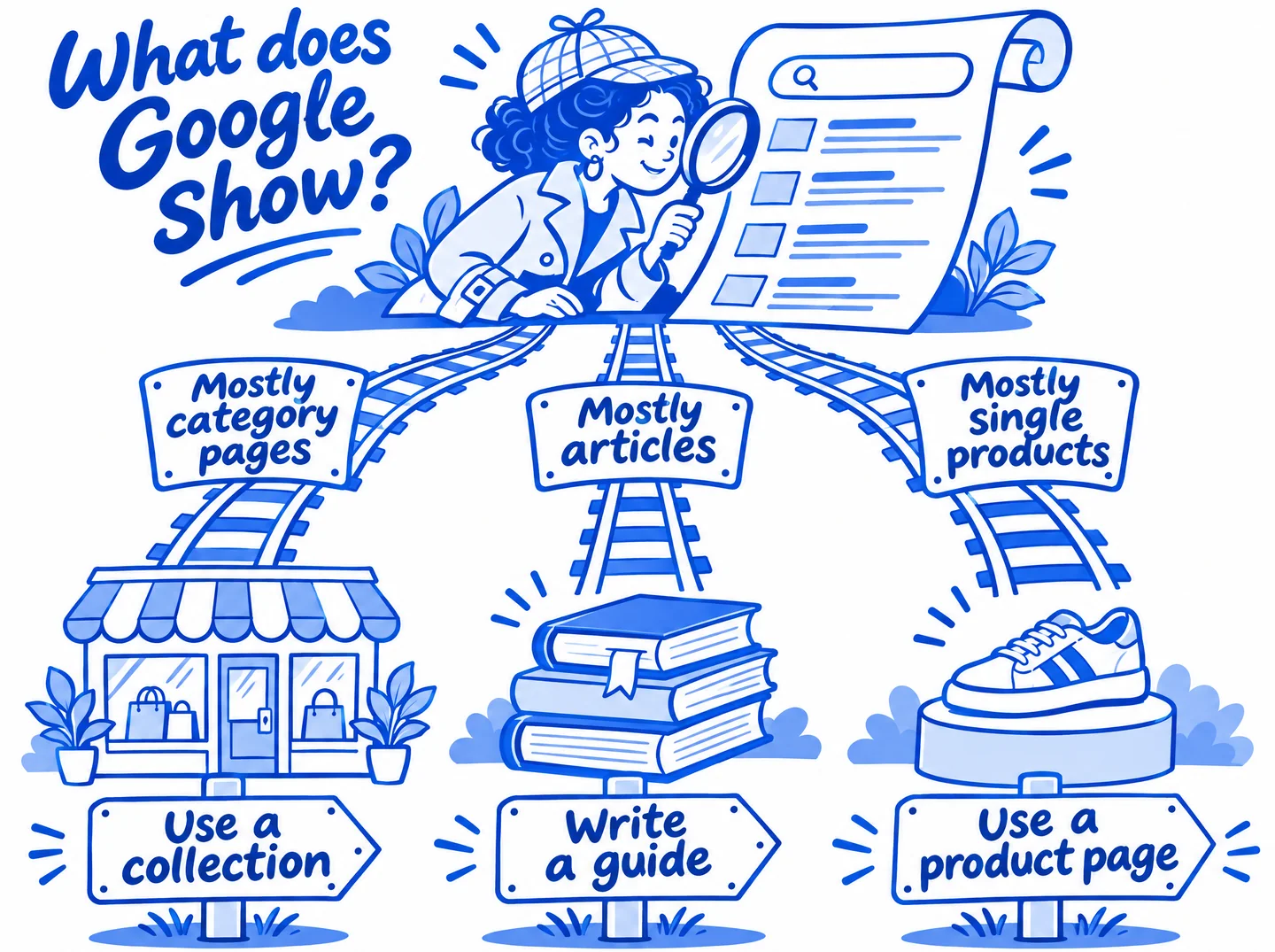
Search the term on Google and look at the results. If most are category pages, a collection is the right format. If most are articles, the searcher wants an answer, so write a guide and link to the collection from it.
Then give each collection one main keyword, along with close variations. "Linen duvet covers" and "linen quilt covers" can share a page. "Linen duvet covers" and "cotton sheets" should not.
Narrow collections are often easier to win. "Women's waterproof hiking boots" has less competition than "hiking boots", and that searcher already knows what they want. Only create the page if you stock enough products to give a real choice.
2. Set the title, description and heading.
Open the collection in your Shopify admin and edit its search engine listing.
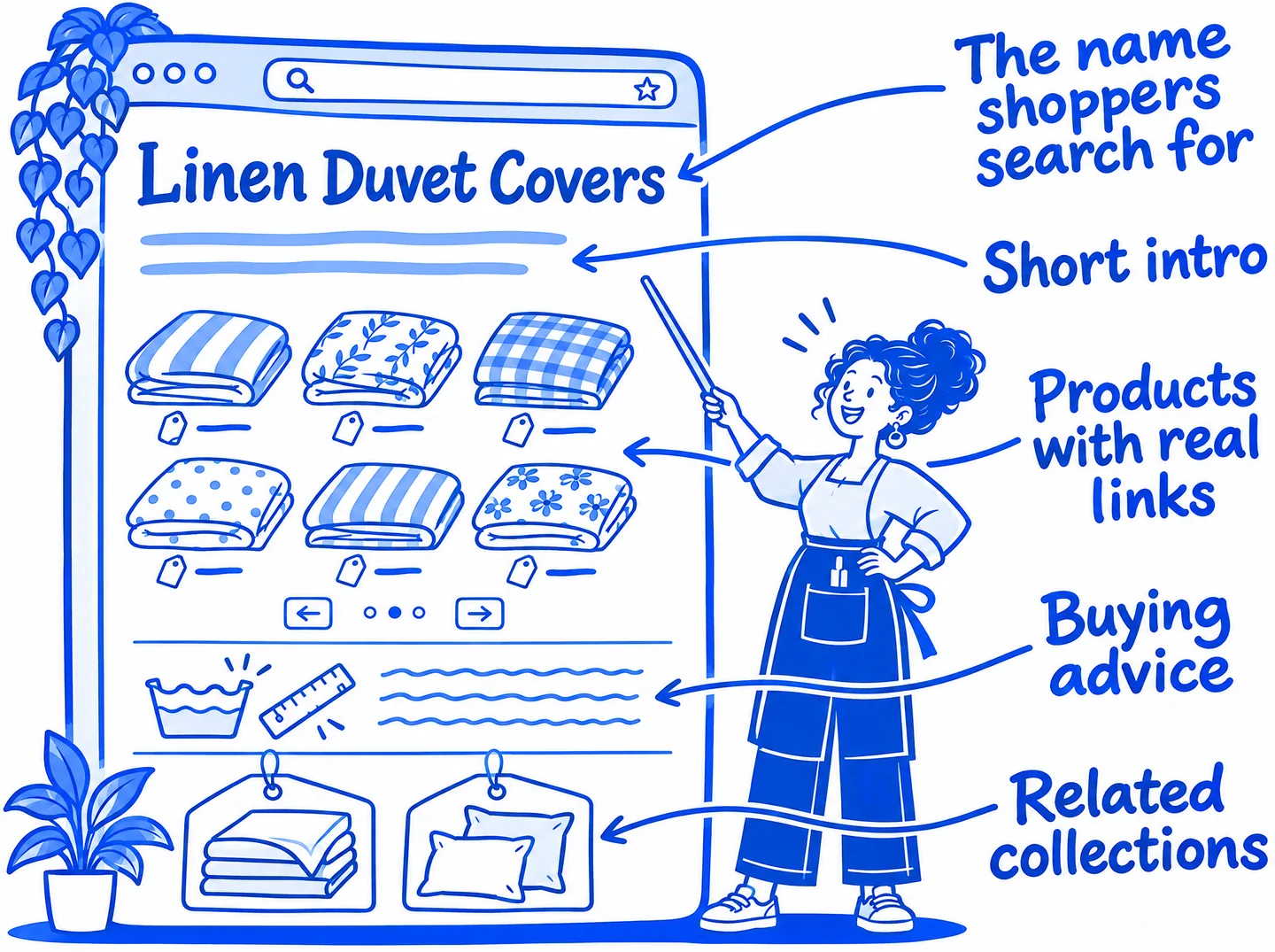
- Title field: Shopify uses this for the H1. Use the name a shopper would search for, such as "Linen Duvet Covers" rather than "The Sleep Edit".
- Page title: Shopify suggests up to 60 characters with the keyword near the start. Add something that earns the click, such as a material or a true shipping offer.
- Meta description: up to about 160 characters, unique to the page, written in plain language.
- URL handle: short and descriptive. On an established page, only change it for a good reason, and add a redirect from the old URL.
3. Write copy that helps people choose.
Copy written only to fit in keywords adds little. Instead, answer what a good salesperson would be asked. Shopify suggests at least 250 words of descriptive text on a page, but there is no reason to pad beyond what is useful.
For a linen duvet cover collection, that could mean:
- How the fabric differs from cotton, and who should choose which.
- How to choose the right size for your market.
- How to wash it, and what to expect over time.
- Links to matching sheets and pillowcases.
Keep a short introduction above the products so shoppers reach them quickly, and put longer buying advice below the grid. Check that your theme actually displays the description, because some templates hide it or show it only on certain devices.
4. Build internal links.
A collection that only appears in a sitemap is hard to promote. Link to priority collections from:
- Your main navigation or a menu section.
- Broader parent collections, such as Bedding linking to Linen Duvet Covers.
- Product pages, using breadcrumbs or a collection link.
- Blog posts that answer related questions, using descriptive link text.
5. Handle filters and sorting.
Google advises against indexing URLs that show the same list with a different filter or sort order. Shopify's default robots.txt already keeps filtered collection URLs in the /collections/*+* pattern from being crawled, so you usually do not need to edit it.
Filter apps and themes vary, so open a filtered page and view its source. Check its URL pattern, and that its canonical tag or robots rule is doing what you expect.
If a filter combination gets real searches, such as "black linen duvet covers", create a dedicated collection with its own copy. Do not rely on a filtered URL to rank.
/collections/linenMain collectionIndex it/collections/linen?page=2Next page of productsOwn canonical/collections/linen/white+cottonCombined tag filterBlocked by default/collections/linen?sort_by=price-ascendingSame list, new orderKeep out of the index/collections/linen?filter.v.color=blackTheme or app filterCheck page source/collections/linen/products/auroraProduct inside a collectionCanonical to /products/6. Check pagination.
Google generally finds new pages through links in <a href> tags. It does not click buttons, and generally does not trigger JavaScript that needs a user action. That matters if your theme or an app uses "load more" or infinite scroll.
To test it, open the page source and search for a link to page 2. Google's guidance is:
- Give each page a unique URL, such as
?page=2. - Link each page to the next one with a normal link.
- Do not make page 1 the canonical URL for every page. Each page should have its own canonical.
- Do not use a
#fragment for page numbers.
Real examples.
Brooklinen: short intro, products right away
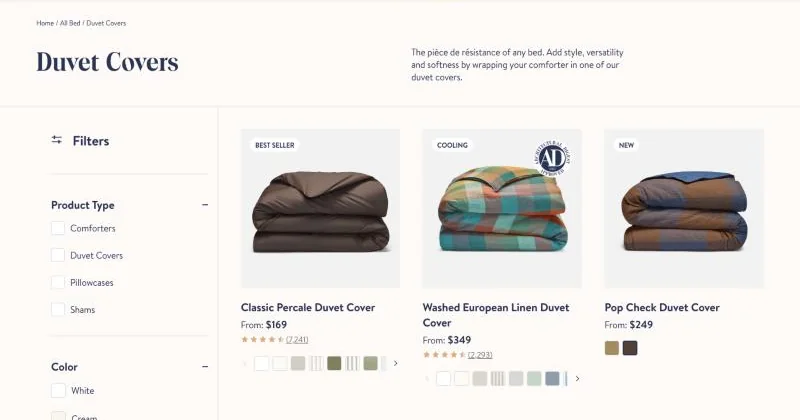
The heading is the plain category name, and a three-line intro sits beside it, so products appear straight away. Filters sit to the left of the grid. See the live page: Brooklinen duvet covers.
Ruggable: intro above, advice below
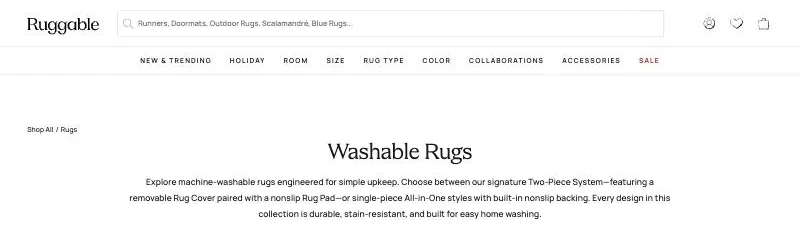
The intro explains the choice shoppers need to make between two rug systems. Further down the page, a section called "A Rug You Don't Have to Tiptoe Around" covers cleaning and upkeep. The page title leads with the keyword: "Washable Rugs: Stain-Resistant & Easy Clean". See the live page: Ruggable washable rugs.
Parachute: crawlable pagination
The page source includes a normal link to ?page=2, the pattern Google recommends, and a canonical tag pointing to the collection URL. See the live page: Parachute duvet covers.
Captured 5 November 2026 from public pages, which may have changed since. These stores are independent of Rankplain and did not take part. They appear to run on Shopify, based on Shopify code in their page source. We cannot see their rankings or results, so these are examples of page structure, not proof of what causes rankings.
7. Measure the result.
Save your position before you edit anything, and note the date of the change. Then check three things after a few weeks:
- Position: has the main keyword moved in the countries and on the devices you sell to?
- Ranking page: is the collection ranking, or has a product or blog post taken its place?
- Clicks and sales: Search Console shows clicks for the page, and your analytics shows what those visits are worth.
If you have many collections, start with those at positions 5 to 20 for a keyword that can bring sales. They are usually closest to producing more clicks.
Common questions.
Should I noindex /collections/all?
It depends on the store. If the page has no search value and is competing with your real collections, you can hide it from search or remove links to it. Check first whether it gets useful traffic in Search Console. It is rarely the top priority.
Should I index collection tag pages?
Usually not, unless a tag page has a real search behind it and enough unique value. For those searches, a dedicated collection gives you more control over the title and copy.
How many products should a collection have?
There is no official number. Use judgment: a page should offer enough choice to satisfy the search. A collection with one or two products often works better merged into a broader one.
Do collections or product pages rank better?
Neither is always better, because it depends on the search. Broad category searches tend to favor collections, while searches for an exact model tend to favor product pages. Check the current results for your keyword.
Sources
- Shopify Help Center: Adding keywords for SEO
- Shopify Help Center: Editing robots.txt.liquid
- Google Search Central: Pagination and incremental page loading
Shopify and Google change their products and advice, so check their current documentation before making large changes. Following a guide does not guarantee rankings. Last reviewed 4 November 2026.